

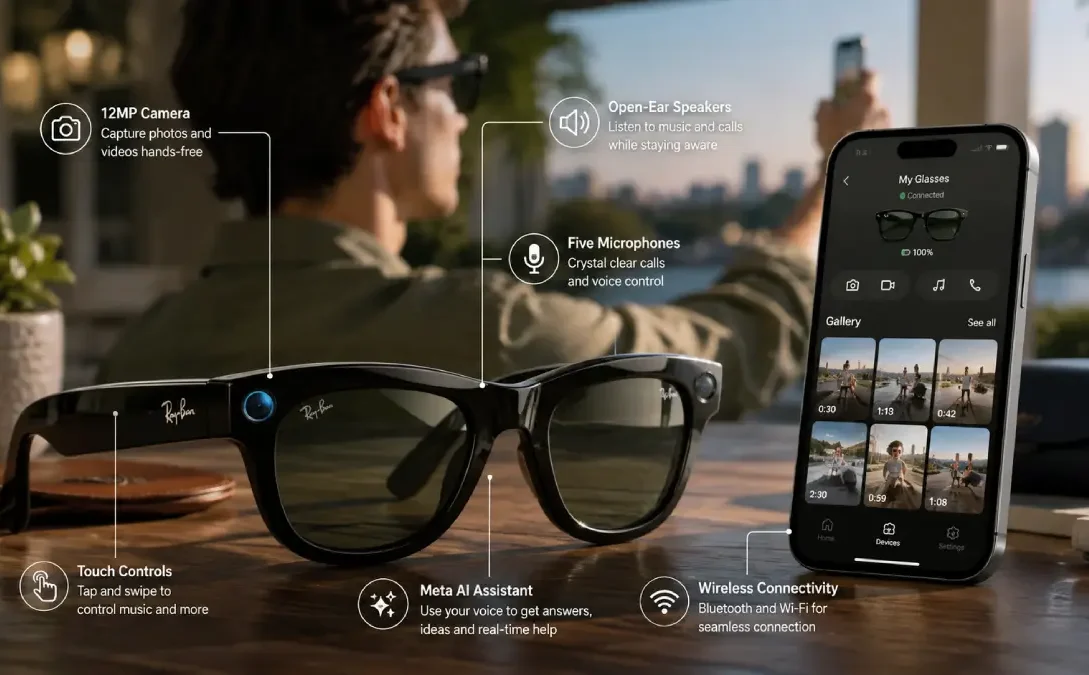
Ray-Ban Meta smart glasses are AI-powered wearable glasses developed by Meta in partnership with EssilorLuxottica. They combine traditional Ray-Ban eyewear with cameras, open-ear speakers, microphones, voice controls and Meta AI, allowing users to take photos and videos, make calls, listen to audio and interact with AI without taking out their phone. The newer Ray-Ban Meta Gen 2 adds up to 3K video recording and up to eight hours of battery life.
What Is Ray-Ban Meta Smart Glasses?
The Ray-Ban Meta smart glasses are designed to appear like traditional Ray-Ban frames but within them are built-in connectivity and computing.
Rather than whipping out a phone to seize an event, the user can take a photo or record a video through the specs, or use their voice command to connect with the Meta AI, operate their media, receive phone calls and complete other hands-free gestures.
Features a multi-mic, inbuilt camera and speaker system. The camera is concealed in the frame and an external capture LED is provided to indicate when it is in use.
It’s the key point and I will emphasis this again that the standard Ray-Ban Meta Glasses does not feature an AR display over the lenses. They are more of a camera, sound and AI glasses rather than AR glasses.
The last Ray-Ban Meta glasses were hurled in September 2023 & replaced previous the Ray-Ban Stories glasses.
When Were Ray-Ban Meta Smart Glasses Launched?
There are several dates worth knowing because the product has gone through different generations.
The second-generation Ray-Ban Meta was officially announced on 27 September 2023. Meta positioned it as the successor to Ray-Ban Stories, with improved cameras and audio, Meta AI integration, voice commands and livestreaming capabilities.
Meta later announced Ray-Ban Meta Gen 2 on 17 September 2025. The newer version kept the same basic concept but introduced significant improvements, particularly to battery life and video capture. Gen 2 became available in India from 1 December 2025, with prices starting at ₹39,900.
Ray-Ban Meta launch timeline
| Version | Launch | Main change |
| Ray-Ban Stories | 2021 | First Ray-Ban connected glasses |
| Ray-Ban Meta | September 2023 | Better camera, audio and Meta AI |
| Ray-Ban Meta Gen 2 | September 2025 | 3K video and significantly longer battery |
So, if someone asks when the Ray-Ban Meta smart glasses launched, September 2023 is the key date for the Ray-Ban Meta generation, while Gen 2 arrived in 2025.
Ray-Ban Meta Smart Glasses Features
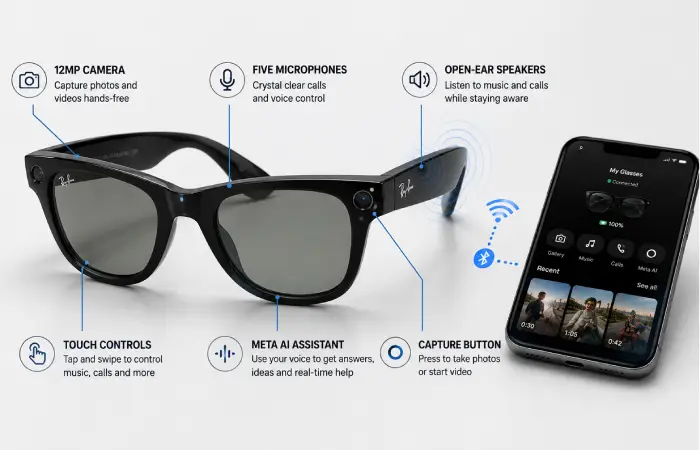
The biggest attraction of the glasses is that several smartphone functions are available directly from the frame.
1. Meta AI
Meta AI is one of the main differences between Ray-Ban Meta and the older Ray-Ban Stories.
Users can interact with the assistant using voice commands and ask questions, identify things they see, get information about places and use AI-related features supported in their region.
Some capabilities vary by country, language and software version, so not every Meta AI feature is available everywhere.
2. Built-In Camera
Ray-Ban Meta glasses include a 12MP ultra-wide camera designed for first-person photography and video.
Gen 2 improves this further, supporting video capture of up to 3K at 30fps. The camera is designed for vertical, social-media-friendly capture, making the glasses particularly useful for hands-free content creation.
3. Open-Ear Speakers
The glasses have two custom-built open-ear speakers.
This allows users to listen to music, podcasts, navigation instructions and calls while still being aware of surrounding sounds.
Gen 2 also increases continuous audio and phone-call endurance compared with the first generation.
4. Five-Microphone Array
A five-microphone system handles voice commands, calls and audio recording.
This is particularly useful when recording videos because the glasses can capture environmental sound from the user’s point of view.
5. Voice Controls
You don’t always need to touch the glasses.
With voice controls enabled, commands such as “Hey Meta, take a photo” or “Hey Meta, take a video” can be used to capture content hands-free.
6. Touch Controls
The glasses also include physical controls and a touch-sensitive area.
Users can control functions such as music playback and volume and use the capture button to take photos or start video recording.
7. Livestreaming
Compatible Ray-Ban Meta glasses can be used for livestreaming to supported Meta platforms.
This makes them interesting for creators who want a first-person perspective without holding a phone or camera.
8. Translation and AI Assistance
Depending on region and software availability, Meta has expanded AI capabilities such as translation and visual understanding.
Gen 2 also supports expanded live-translation capabilities, with additional languages being added through software updates.
9. Storage
Ray-Ban Meta glasses have 32GB of flash storage.
Ray-Ban’s specifications list Gen 2 as capable of holding 500+ photos or 100+ 30-second videos, although the actual number can vary depending on capture settings and file sizes.
10. Water Resistance
The glasses have an IPX4 water-resistance rating. This means they can handle limited splashes, but they aren’t designed to be submerged or treated like waterproof action cameras.
How Many Ray-Ban Meta Smart Glasses Models Are There?
This question can be confusing because model can mean either generation or frame style.
Currently, the main Ray-Ban Meta Gen 2 collection is offered in three major frame styles:
- Ray-Ban Meta Wayfarer
- Ray-Ban Meta Headliner
- Ray-Ban Meta Skyler
Ray-Ban’s India collection lists these three styles across different colours, lens technologies and configurations.
Ray-Ban Meta Wayfarer
The Wayfarer is the most recognisable option and follows Ray-Ban’s classic square-frame design.
It is a good choice for people who want the smart glasses to look close to traditional Ray-Ban sunglasses.
Ray-Ban Meta Headliner
The Headliner uses a more rounded, phantos-style frame.
It provides the same underlying smart-glasses functionality while offering a different appearance.
Ray-Ban Meta Skyler
The Skyler has a more fashion-focused, cat-eye-inspired shape.
It is aimed at people who want the technology in a less traditional Wayfarer design.
Important: Different colours, lens options and sizes don’t necessarily represent completely different technology models. They are generally variations of the same Ray-Ban Meta platform.
Ray-Ban Meta Gen 1 vs Gen 2: Price and Features Comparison
If you’re deciding between generations, the battery and camera improvements are the biggest differences.
| Feature | Ray-Ban Meta Gen 1 | Ray-Ban Meta Gen 2 |
| Camera | 12MP ultra-wide | 12MP ultra-wide |
| Maximum video | 1080p+ | Up to 3K at 30fps |
| Battery | Up to about 4 hours | Up to about 8 hours |
| Storage | 32GB | 32GB |
| Speakers | Open-ear | Improved open-ear audio |
| Microphones | 5-mic array | 5-mic array |
| Wi-Fi | Wi-Fi 6 | Wi-Fi 6E |
| Bluetooth | Bluetooth 5.3 | Bluetooth 5.3 |
| Water resistance | IPX4 | IPX4 |
| Meta AI | Yes | Yes |
Ray-Ban’s India specifications show Gen 2 increasing battery life from up to four hours to up to eight hours, while video capture moves from 1080p+ to up to 3K at 30fps.
Ray-Ban Meta Smart Glasses Price Comparison
Prices depend on the generation, frame, lens type and country.
India price
For Ray-Ban Meta Gen 2, the official India collection currently starts at approximately ₹39,900.
Higher-priced configurations, including certain Transitions and lens options, can reach approximately ₹45,700.
Gen 1 models are also listed in the Indian Ray-Ban catalogue, with some configurations shown around ₹29,900–₹35,700, although availability can vary and some are out of stock.
US price
When Gen 2 launched internationally, Meta announced a starting price of $379 USD.
Therefore, a simple comparison is:
| Market | Gen 2 starting price |
| India | ₹39,900 |
| US | $379 |
Actual retail prices can vary based on lens configuration, frame style, taxes, promotions and availability.
Official product and support information: Ray-Ban Meta official India collection
How Do You Use Ray-Ban Meta Smart Glasses?
Before using the glasses, you need a compatible smartphone, the Meta AI app, a Meta account and an internet connection for supported connected features.
Ray-Ban lists compatibility with Android 10 or later and iOS 14.4 or later, subject to supported-device requirements.
Step 1: Charge the glasses
Place the glasses inside their charging case and charge them before first use.
Step 2: Install the Meta AI app
Install the Meta AI app on your Android phone or iPhone.
Step 3: Turn on Bluetooth
Enable Bluetooth on the phone.
Step 4: Pair the glasses
Open the Meta AI app and follow the setup instructions to connect your glasses.
Step 5: Sign in to your Meta account
A Meta account is required to use the connected Ray-Ban Meta experience.
Step 6: Configure permissions
Allow the permissions required for photos, Bluetooth, Wi-Fi and other functions you want to use.
Step 7: Start using voice or touch controls
Once connected, you can use the capture button, touch controls or voice commands depending on the task.
How to Record a Video on Ray-Ban Meta Glasses
Recording video is one of the simplest features.
Method 1: Use the capture button
Press and hold the capture button to start recording.
Ray-Ban says the glasses can record 30-second, 60-second or 3-minute videos, depending on the selected setting. The default recording length is 30 seconds, but users can change it in the Meta AI app.
Press the button again to stop recording.
Method 2: Use your voice
If voice controls are enabled, say:
“Hey Meta, take a video.”
The glasses will begin recording.
A front-facing white capture LED is designed to indicate to people nearby that the camera is recording.
Can Ray-Ban Meta record secretly?
The glasses are designed with a visible capture indicator to signal recording. Meta has also introduced software safeguards intended to prevent users from blocking or tampering with the recording indicator.
Users should always respect local privacy laws and obtain consent where appropriate before recording people.
How to Transfer Ray-Ban Meta Videos to Your Phone
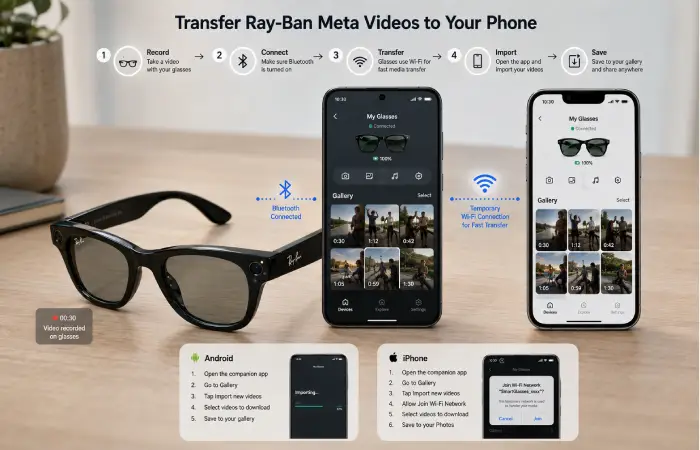
Once you’ve recorded a video, you can import it to your smartphone through the Meta AI app.
The basic process is similar on Android and iPhone, although iOS may display an additional Wi-Fi permission prompt.
How to transfer Ray-Ban Meta videos to Android
- Turn on Bluetooth.
- Make sure the glasses are paired with the Meta AI app.
- Open the Meta AI app.
- Go to the gallery/download area.
- Tap the download/import button.
- Select the videos or photos you want to transfer.
- Allow the glasses and phone to establish the required connection.
- Save or share the imported video through your phone’s gallery.
Ray-Ban notes that faster transfers can use the glasses’ internal Wi-Fi connection rather than relying only on Bluetooth.
How to transfer Ray-Ban Meta videos to iPhone
The process is almost the same:
- Turn on Bluetooth.
- Open the Meta AI app.
- Make sure the glasses are connected.
- Open the gallery/import section.
- Select the video.
- When prompted, allow the iPhone to join the glasses’ Wi-Fi network.
- Wait for the video to transfer.
- Save or share it to the iPhone’s Photos app.
Ray-Ban specifically notes that iPhone users may need to accept the “Join Wi-Fi Network” request when a faster media transfer begins.
Can You Take Ray-Ban Meta Videos Directly to Your Phone?
Yes, but the glasses don’t simply send every video through Bluetooth like a basic Bluetooth accessory.
The Meta AI app manages the media import process. For larger media files, the glasses can temporarily create a direct Wi-Fi connection with the phone to speed up transfer.
Once imported, the video can be accessed through the app and saved to the phone’s camera roll or gallery.
This means you can record a first-person video with the glasses, transfer it to your smartphone and then edit it using apps such as your normal mobile video editor.
Android vs iPhone: Which Works Better With Ray-Ban Meta?
Both Android and iPhone are supported.
| Function | Android | iPhone |
| Pair with Meta AI | Yes | Yes |
| Record photos/videos | Yes | Yes |
| Import media | Yes | Yes |
| Wi-Fi media transfer | Yes | Yes |
| Voice features | Supported | Supported |
| Save media to phone | Yes | Yes |
The main difference you may notice during media import is the permission process. On iPhone, Ray-Ban specifically instructs users to accept the temporary Wi-Fi connection request when necessary.
Ray-Ban Meta Smart Glasses: Who Should Buy Them?
Ray-Ban Meta makes the most sense for people who want hands-free photography, audio and AI features without carrying a dedicated camera.
They can be particularly useful for:
- Travel and sightseeing
- First-person video recording
- Casual content creation
- Walking and cycling
- Hands-free calls
- Listening to music
- AI assistance
- Accessibility applications
- Quick social-media content
However, they aren’t a replacement for a professional camera. The biggest advantage is convenience and point-of-view capture, rather than maximum image quality. For more related articles visit our website.
Are Ray-Ban Meta Smart Glasses Worth It?
The answer depends on how you plan to use them.
For someone who regularly takes first-person videos, makes calls while moving around or wants quick AI assistance, the glasses can provide something a smartphone cannot: hands-free access.
Gen 2 is particularly interesting because the battery life and video capabilities are substantially better than Gen 1. Its ability to record up to 3K video and provide up to eight hours of battery life makes it a more practical option for all-day use.
On the other hand, buyers should remember that these are connected smart glasses. They depend on a smartphone and Meta’s software ecosystem for many features.
Privacy is another important consideration. The glasses have a visible capture LED, and users should be transparent about recording and follow the rules of the location they are visiting.
Frequently Asked Questions
What are the main Ray-Ban Meta smart glasses features?
The main features include a 12MP camera, video recording, open-ear speakers, five microphones, Meta AI, voice commands, touch controls, phone calls, music playback, livestreaming and smartphone media transfer. Gen 2 adds up to 3K video and up to eight hours of battery life.
How much do Ray-Ban Meta Gen 2 glasses cost in India?
Ray-Ban Meta Gen 2 starts at ₹39,900 in India, while some lens configurations cost around ₹42,100 or ₹45,700.
How many Ray-Ban Meta models are there?
The current Gen 2 collection includes three primary frame styles: Wayfarer, Headliner and Skyler. Different colours and lens configurations create additional variants.
Can Ray-Ban Meta record videos?
Yes. Users can record videos using the physical capture button or a voice command such as “Hey Meta, take a video.” Gen 2 supports video capture up to 3K at 30fps.
Can Ray-Ban Meta videos be transferred to Android?
Yes. Videos can be imported through the Meta AI app after pairing the glasses with a compatible Android phone.
Can Ray-Ban Meta videos be transferred to iPhone?
Yes. After pairing with the Meta AI app, users can import videos. iPhone may request permission to join the glasses’ temporary Wi-Fi network during faster media transfers.
Do Ray-Ban Meta glasses need a phone?
A compatible smartphone is required for setup and many connected features. Ray-Ban lists Android 10+ and iOS 14.4+ as minimum operating-system requirements, subject to supported devices.
Do Ray-Ban Meta glasses have a display?
The standard Ray-Ban Meta glasses do not have an in-lens AR display. Their primary functions are camera capture, audio, voice control and AI. Meta has a separate display-equipped product category, so it is important not to confuse the two.
Conclusion
The Ray-Ban Meta smart glasses features make them more than ordinary sunglasses but less than a traditional AR headset. Their appeal comes from combining a familiar Ray-Ban design with a camera, speakers, microphones, Meta AI and hands-free controls.
For buyers in India, Gen 2 is currently the more capable option, starting at ₹39,900. It brings up to 3K video recording, up to eight hours of battery life, 32GB storage and improved AI and audio capabilities.
If your priority is hands-free recording, calls, music and AI assistance, Ray-Ban Meta is a compelling wearable. If you mainly want professional-quality photography or a true augmented-reality display, however, you may need to look at other types of devices.